Paste the same link in email, chat, social posts, documents, or print — every channel routes to the hosted PDF.
Host PDF Online
One URL, any audience
No attachments to manage
Update without re-sharing
Give your PDF a permanent online home.
MaiPDF stores your PDF and gives you a stable URL and QR code. Readers open the file in their browser — no downloads, no cloud drives, no attachments — and your rules, records, and updates all stay attached to that one URL.
Hosting is the layer underneath every MaiPDF share: upload once, get a URL, point people at it. Then layer access control, watermarks, and read alerts on top as needed.
Stable URL + QR
No account required
Swap file anytime
HTTPS delivery
Readers don't need the file — they open the URL. Inbox quotas, version confusion, and blocked attachments all go away.
Replace the file in Control Center and every existing link continues to serve the latest version. No recalls, no v2 emails.
Upload
Get URL
Browser viewer
Reader opens a web page
The hosted PDF renders inside the browser viewer — no app install, no download pop-up.
Reading code for later
Each hosted share has a reading code you can use any time to manage rules or swap the file.
Workflow
Upload once, then keep the same URL for as long as you use it.
Four steps take you from a local PDF on your desktop to a live hosted URL that readers can open anywhere. One caveat worth knowing up front: a share that goes unread for around three months is cleared during routine server cleanup, so a file you want to keep live indefinitely should actually be getting opened — or be re-uploaded when it matters again.
1
Upload
Drop a PDF on the MaiPDF upload page — no account, no sign-up. The file uploads and is stored on MaiPDF's servers.
2
Set optional rules
Add open limit, email verification, expiry, watermark, view mode — or skip these and host a plain public file.
3
Copy URL or QR
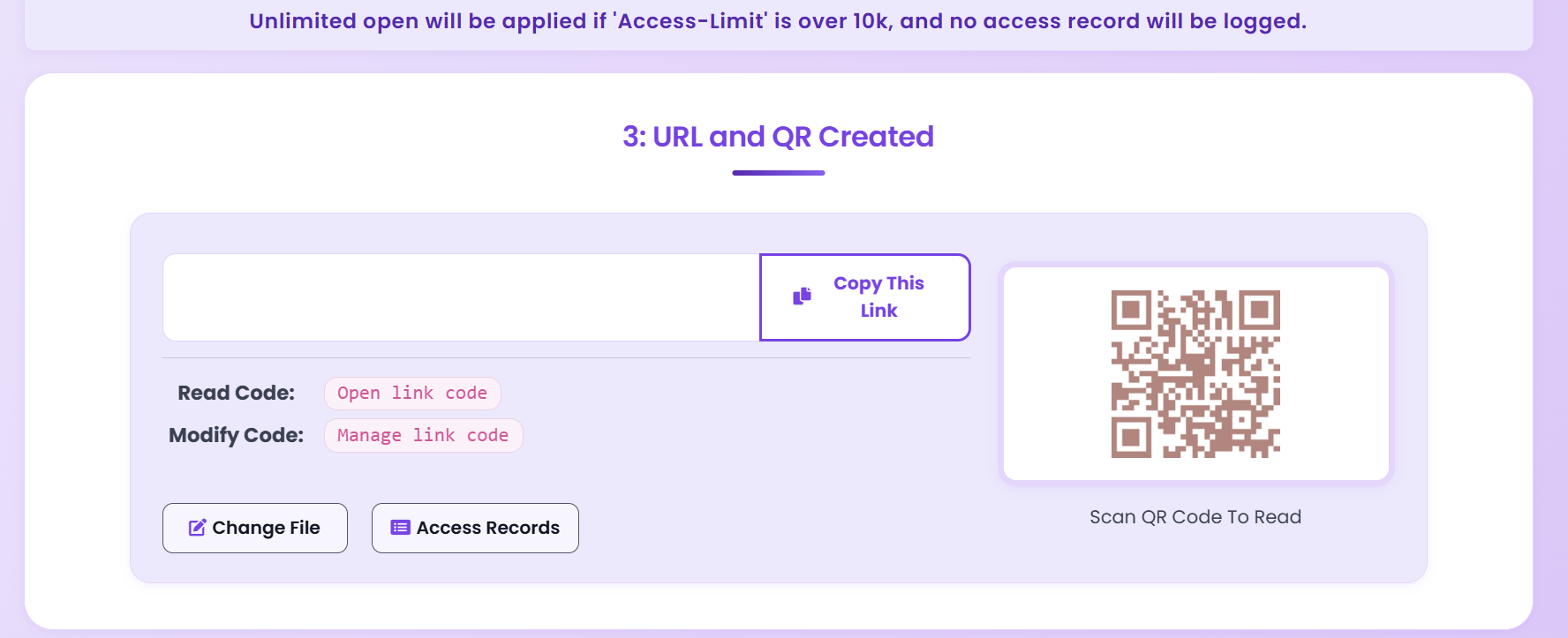
MaiPDF generates a stable hosted URL plus a QR code for the same file. Share either — both open the same hosted PDF.
4
Manage with the code
Keep the reading code. Any time later, open Control Center and you can inspect records, change rules, or replace the file.
Everything after upload is optional — you can host a plain file in seconds.
The URL doesn't change when you update rules or swap the file.
Both URL and QR point to the same hosted copy.
Hosted URL
What you get after hosting.
A hosted MaiPDF share is more than a download link — it's a managed page you can update, gate, and inspect.
Stable hosted URL
A short, readable URL that points to the hosted PDF viewer. You can paste it in emails, chat, social media, or printed materials, and it keeps working.
Matching QR code
Same file, encoded as a QR. Drop it into slides, signage, business cards, or flyers — scanning opens the hosted PDF on any phone.
Built-in browser viewer
The hosted URL loads the PDF inside MaiPDF's viewer. Readers don't need Adobe, don't need to download, and don't see a raw file unless you enable it.
Reading code for the owner
You keep a reading code that unlocks Control Center for this share — even without an account — to inspect records or change rules.
HTTPS by default — the hosted file is served securely.
The URL is independent of the uploader's device — it keeps working after you close your laptop.
Mobile and desktop browsers both render the same viewer.
Hosting vs Email Attachment
Why a hosted URL beats attaching a file.
Email attachments used to be the default. For anything longer than a one-off, a hosted URL is now the safer, cleaner choice.
| Concern | Email attachment | Hosted URL on MaiPDF |
|---|---|---|
| Version control | Each attachment is a frozen copy — readers end up on v1 while you're on v3. | Replace the share; the URL is unchanged and every recipient sees the latest file. |
| Inbox limits | Large attachments bounce or get blocked silently. | Link is tiny; the file size is not carried over email at all. |
| Revoking access | Once sent, you can't pull it back — the copy is on their disk. | Expire the share, set the limit to zero, or delete it — the URL stops serving. |
| Seeing who opened it | You don't know. Email read receipts are unreliable and often blocked. | Access records show opens; add email verification for named records. |
| Rules on the file | None — a PDF attachment is just a file. | Open limit, expiry, email gate, watermark, view-only, read alerts. |
Hosting vs Cloud Drive
Why hosting isn't just "a shared Google Drive link".
General-purpose cloud drives are great for collaboration — but for a PDF you want to show the world (or a specific reader), hosting is a better shape.
Built for collaboration, not publishing
- Readers often need an account or sign-in on the drive.
- Permissions are at the folder level, not per-file rule.
- Viewer is generic — no watermark, no FenceView, no read alert.
- Replacing the file usually breaks links or creates duplicates.
Built for reading and controlled sharing
- No reader account; optional email verification gate you control.
- Per-file rules: open limit, expiry, email gate, watermark.
- Viewer with FenceView, no-download, and dynamic watermarking options.
- Swap the file in place — same URL, updated content, named records intact.
Manage & Replace
Your hosted file, still yours after sharing.
Hosting isn't fire-and-forget. You can see who opened the file, end access, and put a new version behind the same URL. Note the shape of it: session length is the only rule with a direct control — open limit, expiry, allowlist, view mode and watermark are set at upload and change by replacing the share.
Swap the file
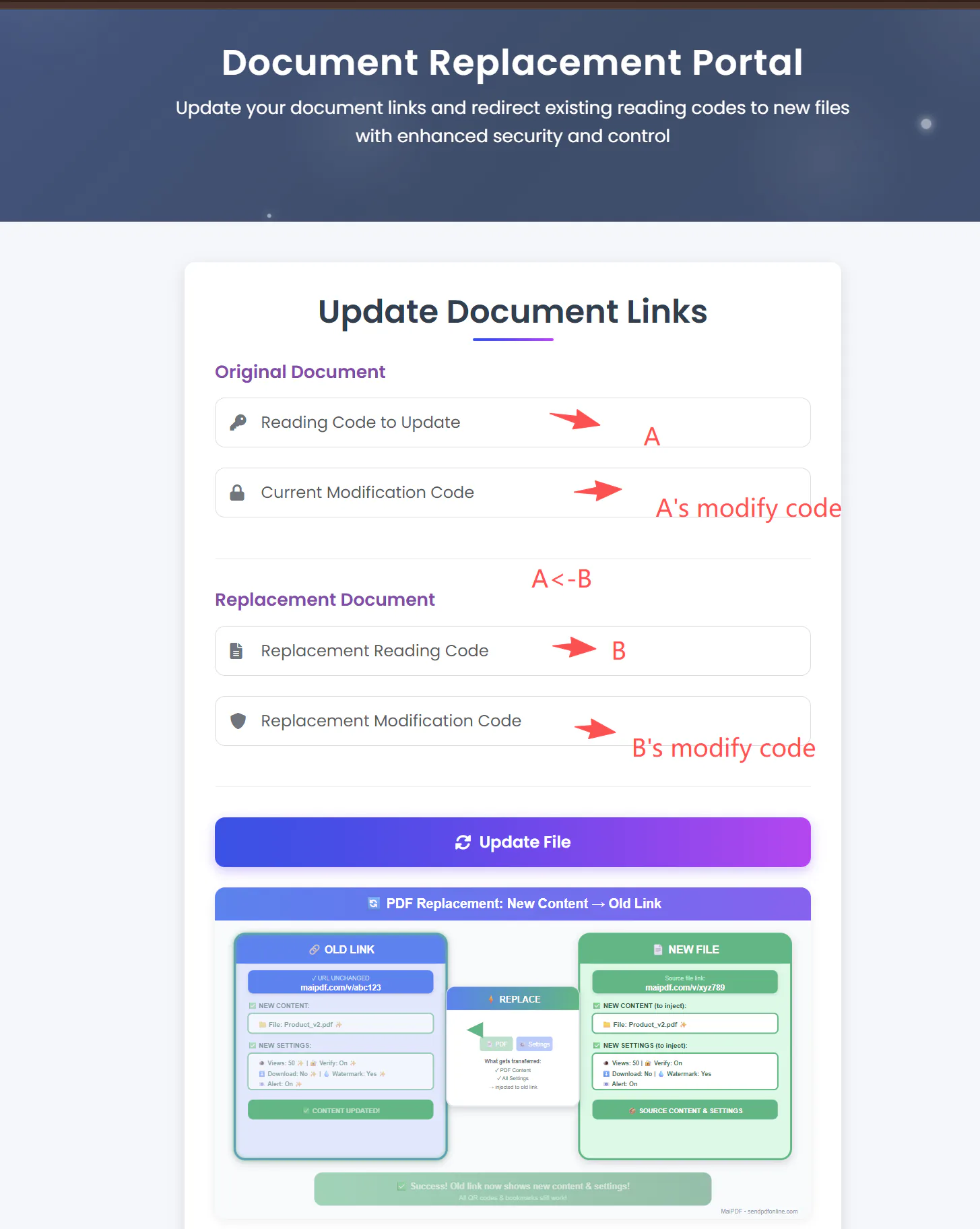
Upload a new version; the hosted URL and QR stay identical. Readers always see the latest version without touching their bookmarks. For the full delete, replace, and guest-mode workflow, see the delete and replace PDF guide.
Change rules anytime
Session length can be changed directly. The open limit, expiry, email allowlist and view mode are set at upload and change by replacing the share — the link stays the same, and the new rules apply on the next reader session.
See who opened it
Access records show open history per share — with named emails when verification is on. Layer Telegram alerts for real-time signal.
Retire the share
Set expiry to now, cap the count, or delete the hosted share when you're done — the URL stops serving immediately.
Use Cases
Where online hosting fits best.
Hosting earns its keep whenever a PDF needs to stay live at a stable URL — for multiple readers, across channels, over time.
Always-current brochure
Host your company or product brochure once. Put the URL and QR on your website, business cards, and printed flyers. Update the file mid-year without re-printing.
Price list & spec sheets
A hosted PDF of prices or tech specs is always current — the moment you replace the file, every downstream link reflects the new numbers. No "is this still accurate?" emails.
Sales proposals
Host each proposal at its own URL. Gate with email verification, layer read alerts, and swap the file if the deal evolves. Records tell you exactly who revisited.
Event programs & handouts
Host once, print the QR on badges and signage. Attendees scan to read on their phones — no app, no login. Expire the share after the event closes.
Academic & training material
Course syllabi, lecture notes, and reading lists stay at a stable URL. Update for each cohort without re-issuing the link; gate by the institution's email domain.
Policy & compliance documents
Host the canonical policy PDF at one URL; link to it from intranets, onboarding docs, and wikis. Replace the file after each revision — everyone automatically reads v-latest.
FAQ
Common questions before you host.
Short answers to what most people ask before putting their first PDF online with MaiPDF.
What exactly does "hosting a PDF online" mean on MaiPDF?
MaiPDF stores your PDF on its servers and gives you a stable, HTTPS URL plus a QR code. Anyone opening the URL sees the PDF inside MaiPDF's browser viewer — the file lives on MaiPDF, not on your laptop or inside an email attachment.
Do I need to create an account to host a PDF?
No. You can upload and host a PDF with no sign-up. MaiPDF issues two codes: a reading code, which is the public part of the link, and a modification code, which is what proves the share is yours. Keep both and you can replace it, delete it, or read its access records later without ever logging in. Lose the modification code and none of that is possible.
How long does a hosted PDF stay online?
There's no forced expiry — a hosted share stays live until you expire it, hit the open limit you set, or delete it. You can keep a hosted brochure live indefinitely, or configure a short-lived share that auto-retires after a deadline.
Can I replace the hosted file without changing the URL?
Yes — this is the main reason teams move from attachments to hosting. You upload the new PDF as its own share first, then point the existing link at it. Signed in, you pick both files in Control Center; as a guest, you use replace-file.html with both reading codes and both modification codes. The hosted URL and QR keep serving the latest file throughout.
Is the hosted URL public, or can I restrict access?
By default the URL is open to anyone who has it, but the PDF still renders inside the MaiPDF viewer. You can tighten access with email verification, an open limit, expiry, or FenceView and no-download. Rules can be turned on at upload or added later.
What's the difference between hosting and sharing on MaiPDF?
Hosting is the storage and URL layer — your PDF lives online at a stable address. Sharing is what you do with that address — sending the URL or QR to readers. MaiPDF does both in one upload: the same action produces a hosted file and an ready-to-share URL.
Is there a file-size limit for hosted PDFs?
Standard PDF sizes (dozens to a few hundred megabytes) are supported. Very large files may take longer to upload — if you run into a limit, trim the PDF (flatten, compress images) or contact support about larger quota.
Is hosting on MaiPDF secure?
Files are served over HTTPS. On top of the transport layer, you can add email verification, open limits, expiry, FenceView, no-download, and dynamic watermarking for extra control. Security is layered — use whatever combination fits the sensitivity of the file.
Does hosting work for readers on mobile devices?
Yes. The hosted URL opens inside the reader's browser, so it works on desktop, iPad, and phone. No app install is needed. The QR code makes mobile opens especially easy for in-person events and print materials.
Can search engines index my hosted PDF?
Hosted shares are not actively promoted to search engines. If you want the PDF indexed, link to it from your own site; if you want it kept private, add email verification or do not publish the URL. You decide how visible the share is.
Product boundary · Online Sharing vs App DRM
Use the browser for reach. Use the app for capture protection.
A hosted PDF gives you a stable browser URL that can keep serving the latest file. It does not turn the PDF into an encrypted, device-bound document. When screenshot blocking, encrypted .maipdf files, device binding, or remote revoke is required, use MaiPDF App DRM.
Start Here
Upload a PDF and get your hosted URL.
No account, no credit card, no app. Upload, copy the hosted URL and QR, and you're live — with the option to add rules and swap the file later.