Controlled web link or QR code with access rules, tracking, replacement, and revocation.
PDF Protection Guide
Choose Online Sharing, App DRM, or PDF to Image.
The three routes solve different problems. Online Sharing controls a hosted link or QR code. App DRM packages files as encrypted .maipdf with anti-screenshot, device binding, virtual-machine blocking, and revoke controls. PDF to Image — the tool sits at drm.maipdf.com/flatten, which is why it is also called Flatten — turns selectable text into image-style pages before you share the result.
Use this page as a timeline-style comparison: start with Online Sharing for normal distribution, branch to App DRM when the handoff must be a protected package, and flatten first only when direct text copy is the risk.

Encrypted .maipdf package delivery when a hosted page is not enough.
Image-style PDF pages when direct text selection and copy-and-paste are the issue.
Tool comparison
Three tools, three different jobs.
Each card is readable on its own: what it protects, when to use it, when not to use it, and the basic workflow.
01
Online Sharing
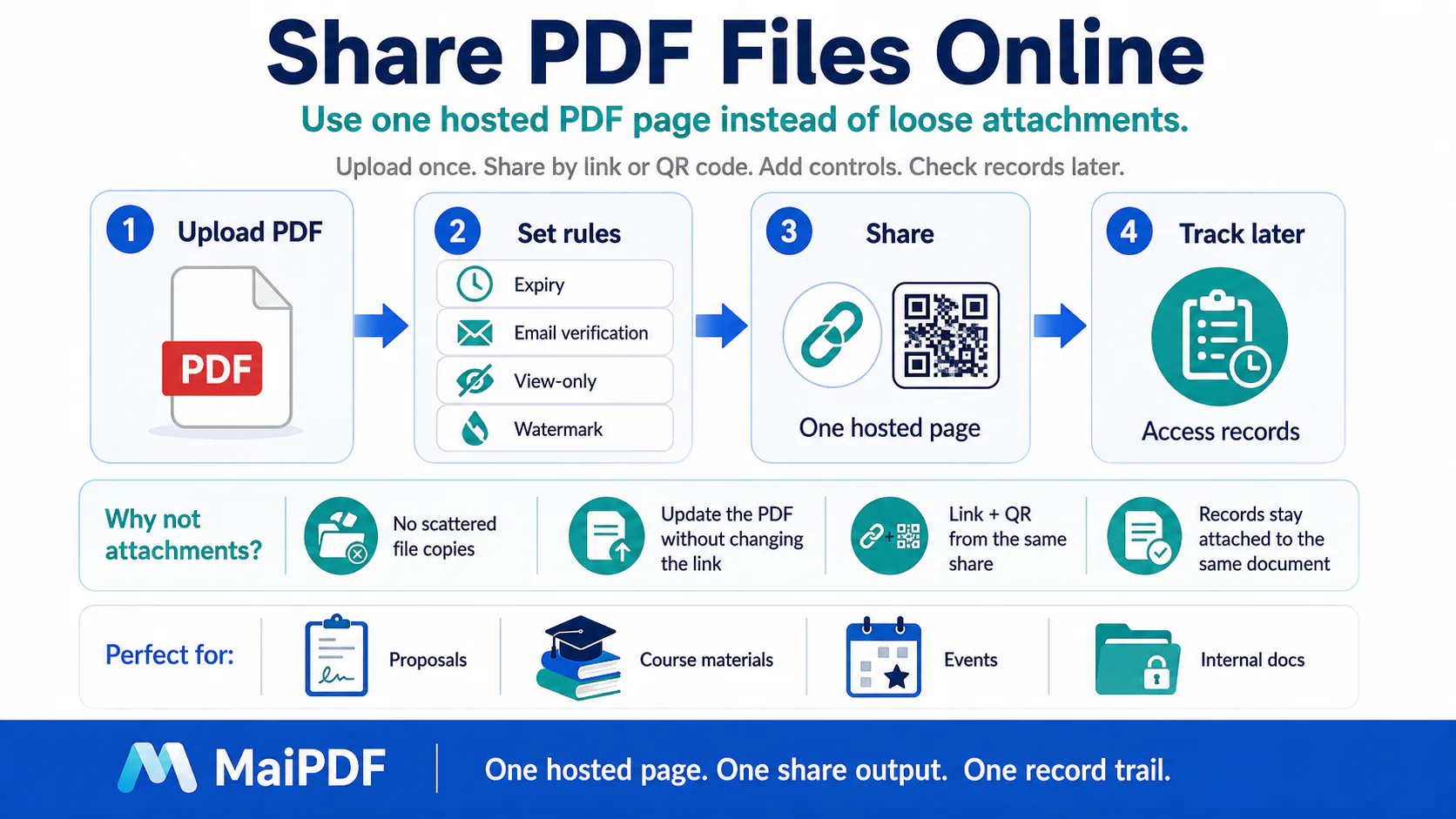
Controlled link and QR delivery
- Use when
- You can keep the PDF online and send a link or QR code.
- Protects
- Access rules, expiry, open limits, email checks, watermarking, read records, replacement, and revocation.
- Avoid when
- The recipient must receive an encrypted
.maipdfpackage instead of a hosted page.
UploadSet rulesShare link / QRTrack or revoke
Open Online Sharing
02
App DRM
Encrypted .maipdf package route

- Use when
- A link-only workflow is not enough and the reader needs an encrypted
.maipdfpackage with app-based opening. - Protects
- Opening behavior, anti-screenshot capture blocking, device binding, virtual-machine blocking, expiry, open limits, watermarking, and revocation.
- Avoid when
- A normal hosted link is acceptable and you mainly need easy updates, records, and revocation.
UploadSet App DRM rulesGenerate .maipdfValidate device
Open App DRM
03
Flatten
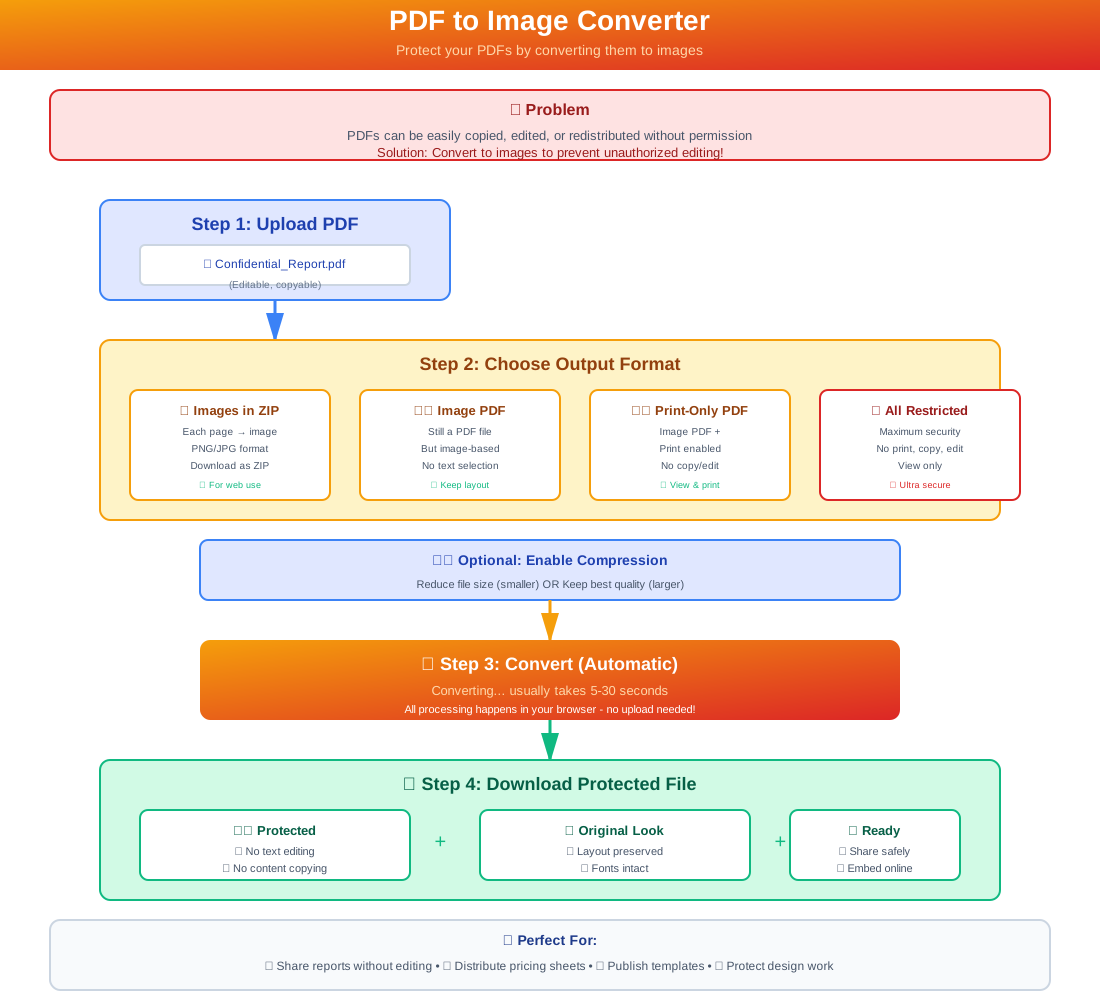
Text-copy reduction layer
- Use when
- The main issue is direct text selection or copy-and-paste from the PDF.
- Protects
- The page form by converting text-based pages into image-style PDF pages.
- Avoid when
- You need user access control by itself; put the flattened PDF into Online Sharing or DRM for that.
Text PDFFlatten pagesImage-style PDFShare or package
Open Flatten
Decision flow
Choose by asking the questions in order.
This keeps the timeline format without turning the page into a hard-to-read table.
Can the PDF stay online?
Use Online Sharing. It gives the best everyday control for links and QR codes.
Does the reader need a protected file?
Use App DRM when the handoff must be an encrypted .maipdf package with controlled app opening.
Is direct text copy the problem?
Flatten first, then share or package the resulting image-style PDF.
Are there two different risks?
Layer the tools: Flatten for text copy, Online Sharing or DRM for access and delivery.
Layer order
How the three tools fit together.
Do not market them as one magic protection switch. Use each tool where it is strongest.
1
Flatten first, if needed
If selectable text is the concern, convert the PDF into image-style pages before sending it into a sharing or DRM route.
2
Share online by default
If a link or QR code works, Online Sharing gives the strongest day-to-day control: rules, tracking, updates, and revocation.
3
Use App DRM for file handoff
Choose App DRM when the recipient needs a protected .maipdf package rather than a normal hosted page.
4
Do not confuse the jobs
Flatten changes page form. Online Sharing controls a live share. App DRM controls a protected file route.
Online Sharing is usually first because it keeps a live control point for link and QR based delivery.
App DRM is for encrypted .maipdf delivery when a link-only workflow is not enough.
Flatten is a page-conversion layer, useful before either route when direct text copy matters.
Beyond The Browser · App DRM
Want the operating system itself to refuse the screenshot?
Link sharing protects the file inside the browser. The MaiPDF app goes one level deeper: it hands the document to a native reader that asks the operating system to mark the window as protected. A screenshot or screen recording comes back black — and the reader still reads the page normally, with no overlay in the way.
FLAG_SECURE; on Windows, WDA_EXCLUDEFROMCAPTURE; on macOS the window’s sharingType is set to none; on iOS the content is rendered through a layer the system excludes from capture.What the app adds on top of link sharing
- OS-level capture block: the screenshot and screen recording come back black — no overlay, no reading friction. One exception worth knowing: on iOS, while a screen recording or AirPlay mirror is actually running, the app covers the page for the reader too, rather than letting it stay visible on a screen that is being broadcast.
- Encrypted
.maipdfcontainer: AES-GCM 256-bit; the file only opens inside the app, never as a raw PDF on disk. - Traceable watermark: every page carries a faint tiled code tied to that reader and device, and it cannot be switched off. If a page is photographed and leaks, the app’s Trace watermark tool takes the code off the image and tells you who opened the file, when, and on which device.
- Device binding & revoke: tie a file to a device and cut off access at any time, even after delivery.
- Hostile-environment block: refuses to open on rooted, jailbroken, or virtual-machine setups where capture is trivial.
No reading friction.
Screenshot returns black.
Every page watermarked.
Where the app is stronger
- The OS refuses the capture instead of relying on something the eye can read around.
- Screen recording is blocked at the source, not just covered frame by frame.
- Reading stays comfortable — the page is fully visible, no moving overlay.
- Protection travels with the file, not just with the browser link.
What it still cannot stop
- An external camera pointed at the screen — no software stops that.
- Unsupported, rooted, jailbroken, virtualized, or policy-bypassing environments should be blocked instead of trusted for sensitive files.
- It needs the reader to install the app, so it is for high-sensitivity files, not casual shares.
- Like any single control, it is one layer — pair it with watermark, expiry, and records.
Recommended start
Start with Online Sharing, add Flatten or DRM only when that specific risk appears.
Flatten solves text-copy concerns. App DRM solves protected .maipdf delivery. Online Sharing solves controlled link and QR distribution.